IntelliMed QuickShot
Make medical photos easy
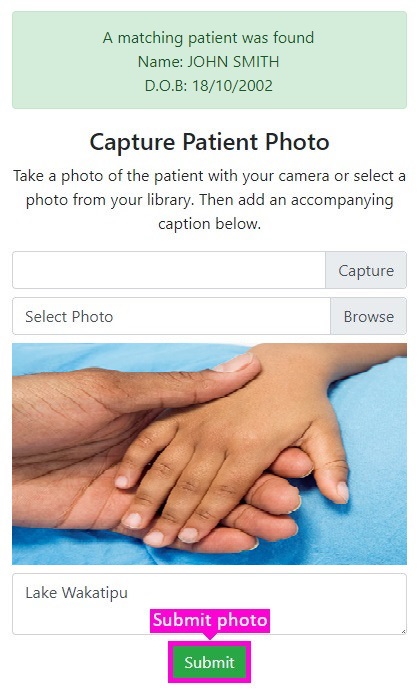
QuickShot streamlines the handling of medical photos by automating the process, from photographing the patient, uploading the photo into your PMS, and making sure it ends up in the correct patient and provider inboxes.
QuickShot can integrate with most systems including Medtech Evolution, Medtech 32, and Gensolve.
Just 4 Simple Steps
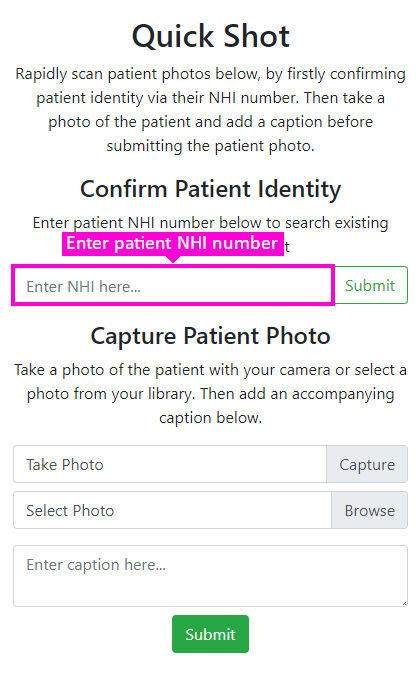
01 | Enter NHI |
First, enter the patient’s NHI number into the
indicated field, and click Submit.
This
will return identifying patient information, helping
you to double-check the correct patient is selected.
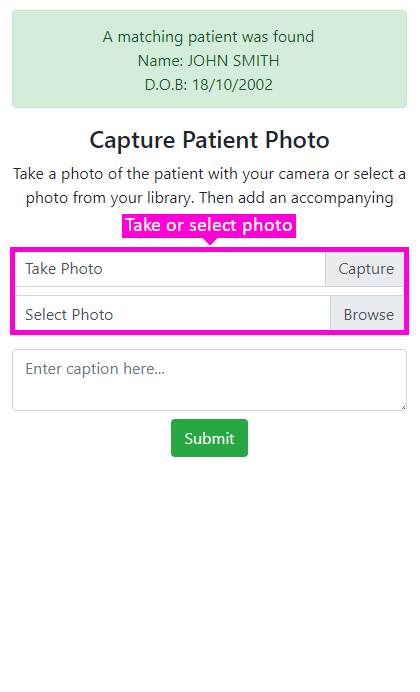
02 | Take photo |
With the patient now selected, take a photo of the
patient, or select an existing photo already on your
device.
To help confirm your submission,
a preview of the selected photo will be shown below.
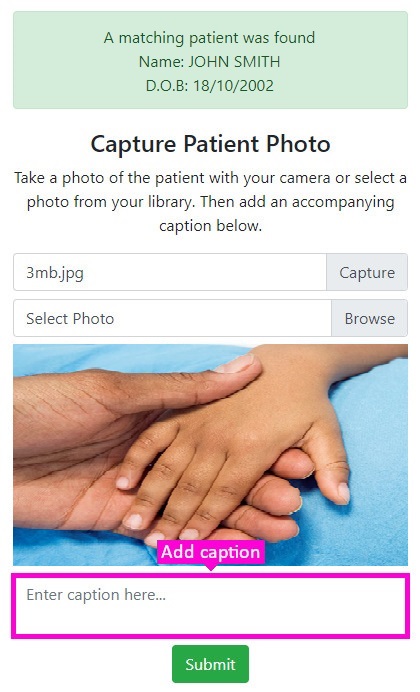
03 | Enter caption |
With the patient now selected, take a photo of the
patient, or select an existing photo already on your
device.
To help confirm your submission,
a preview of the selected photo will be shown below.
04 | Select photo |
With the patient now selected, take a photo of the
patient, or select an existing photo already on your
device.
To help confirm your submission, a preview of the
selected photo will be shown below.